# Alerts
{% stepper %}
{% step %}
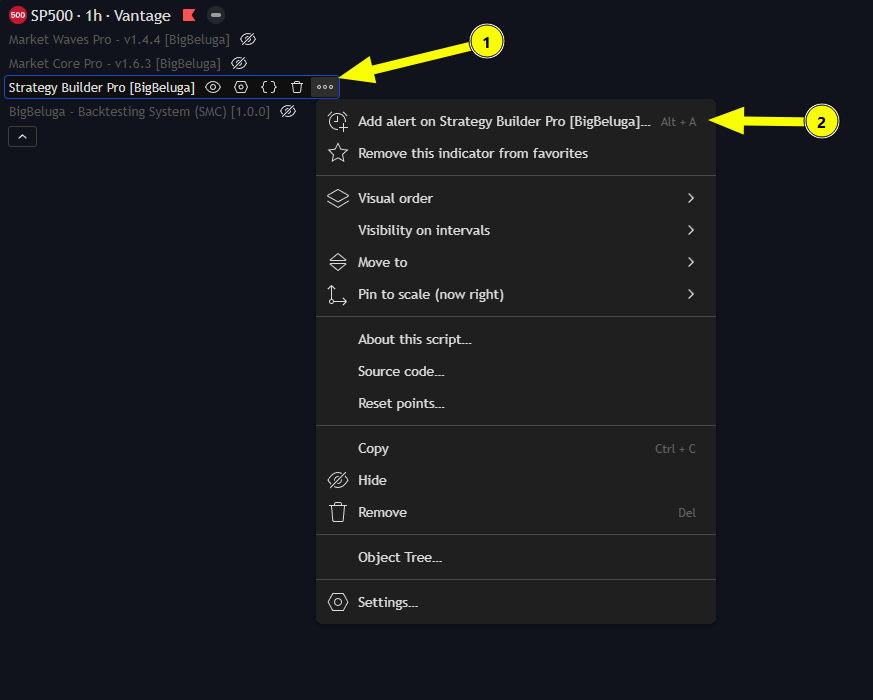
### Add Alert
{% endstep %}
{% step %}
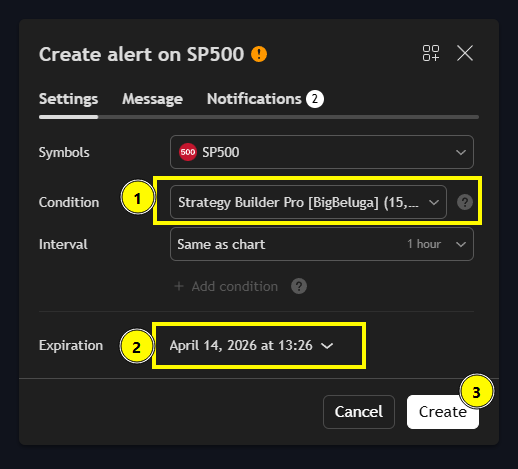
### Set Condition
{% endstep %}
{% step %}
### Customize the Alert Message
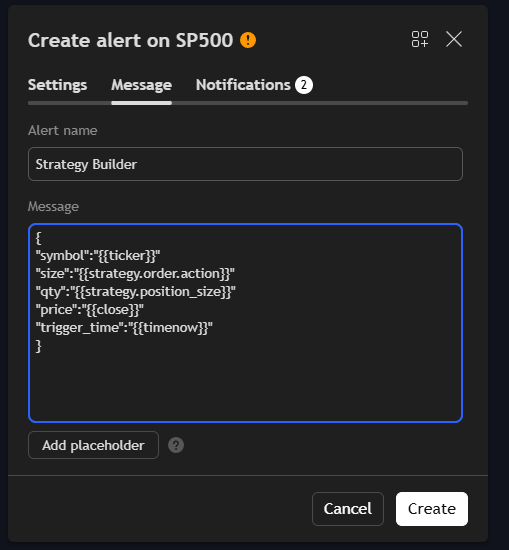
Enter a clear **Alert Name** and edit the **Message** that will appear when the alert triggers.\ You can also add **placeholders** like
* `{{ticker}}` - ticker of the symbol used in alert (AAPL, BTCUSD, etc.)
* `{{interval}}` - returns the interval (i.e. timeframe/resolution) of the chart that the alert is created on
* `{{strategy.position_size}}` - returns the value of the same keyword in Pine, i.e., the size of the current position.
* `{{strategy.order.action}}` - returns the string “buy” or “sell” for the executed order.
* `{{strategy.order.contracts}}` - returns the number of contracts of the executed order.
* `{{strategy.order.price}}` - returns the price at which the order was executed.
* `{{strategy.order.id}}` - returns the ID of the executed order (the string used as the first parameter in one of the function calls generating orders: strategy.entry, strategy.exit or strategy.order).
* `{{strategy.order.comment}}` - returns the comment of the executed order (the string used in the comment parameter in one of the function calls generating orders: strategy.entry, strategy.exit or strategy.order). If no comment is specified, then the value of *strategy.order.id* will be used.
* `{{strategy.order.alert_message}}` - returns the value of the alert\_message parameter which can be used in the strategy's Pine code when calling one of the functions used to place orders: strategy.entry, strategy.exit or strategy.order. This feature is only supported in Pine v4 and higher.
* `{{strategy.market_position}}` - returns the current position of the strategy in string form: “long”, “flat”, or “short”.
* `{{strategy.market_position_size}}` - returns the size of the current position as an absolute value, i.e. a non-negative number.
* `{{strategy.prev_market_position}}` - returns the previous position of the strategy in string form: “long”, “flat”, or “short”.
* `{{strategy.prev_market_position_size}}` - returns the size of the previous position as an absolute value, i.e. a non-negative number.
**Example:**\ Alert name: Strategy Builder\ Message:
{
\
"symbol":"{{ticker}}"
\
"size":"{{strategy.order.action}}"
\
"qty":"{{strategy.position\_size}}"
\
"price":"{{close}}"
\
"trigger\_time":"{{timenow}}"
\
}
{% endstep %}
{% step %}
### Click **Create Alert**
Once all settings are configured — click **Create Alert** to activate it.\ Your alert will now monitor the Strategy Builder trades automatically and send a notification as soon as the trade appears.
{% endstep %}
{% endstepper %}